



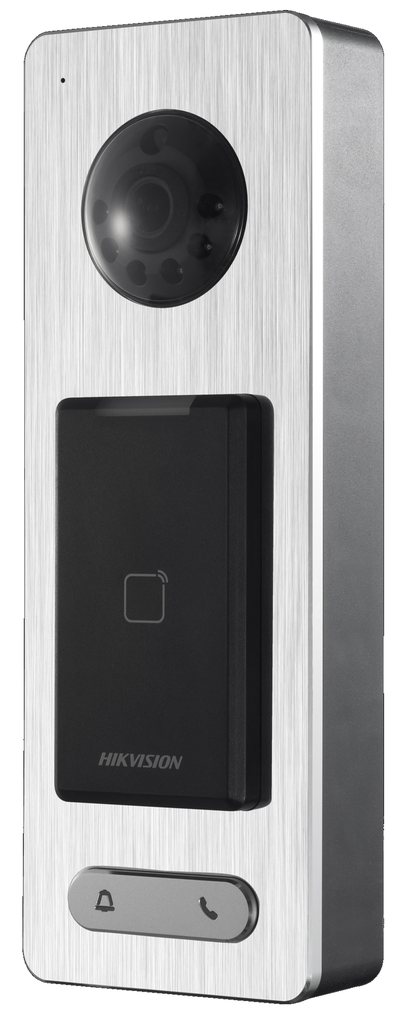
HIKVISION DS-K1T500S Video and Card Access Terminal
2 Mega pixels camera
50,000 card and 200,000 event storage
Built-in card reader for Mifare1 card
Wiegand interface and RS-485 interface for accessing controller
EHome for public network communication
Face detection and picture capture function
Video intercom function
IP65
Hikvision DS‑K1T500S – IP65‑Rated Video Access Control Terminal.
The Hikvision DS‑K1T500S is a robust video‑enabled access control terminal designed for secure authentication, video capture, and door control in networked access systems. Featuring an integrated HD camera, smart card reader, two‑way audio, and flexible communication options, this terminal is ideal for indoor and outdoor installations in offices, commercial buildings, residential entrances, and other controlled access points.
Key Features :
Video access control: Built‑in 2 MP (1080p) camera with optional IR lighting supports face detection and image capture for identification and event verification.
Smart card access: Integrated MIFARE card reader supports up to 50,000 cards for credential‑based authentication.
Large event storage: Stores up to 200,000 access events and supports video/image storage via microSD card (up to 128 GB) or NVR.
Multiple authentication modes: Supports card, QR code, or card + PIN verification when integrated with management software.
Communication interfaces: Networked operation via TCP/IP, RS‑485, Wiegand (26/34) interfaces for controller integration.
Two‑way audio: Built‑in microphone and speaker enable intercom functions and event audio.
Flexible inputs/outputs: Includes doorbell button, exit button, door sensor, alarm inputs, tamper detection, lock relay, and alarm output.
Outdoor ready: IP65‑rated protection against dust and water makes the device suitable for outdoor environments.
Wide operating range: Designed to operate in temperatures from approx. ‑40 °C to +70 °C and 10 %–90 % humidity (non‑condensing).
Durable design: Brushed metal faceplate with robust housing for high‑traffic access points.
Once the user has seen at least one product this snippet will be visible.
Recently viewed Products
To install this Web App in your iPhone/iPad press
and then Add to Home Screen.